



UpLead is a B2B contact data platform for building cleaner prospect lists, finding verified business emails, enriching missing company or contact details, and moving usable records into the tools your team already works from.
That focus is a strength if you want data quality and simplicity. It’s also the main limitation if you want native sequences, multi-step outbound automation or a broader sales engagement workflow inside the same platform.
UpLead Review Summary
Here is the short version: UpLead is a strong fit if you care more about verified contact data, enrichment and clean CRM export than running outreach from the same platform.
- Best for: small B2B teams that want verified emails and cleaner list building.
- Not ideal for: teams that need built-in sequences, deep outbound automation or advanced team controls.
- Pricing: no free plan; 7-day free trial; paid plans start at $99/month.
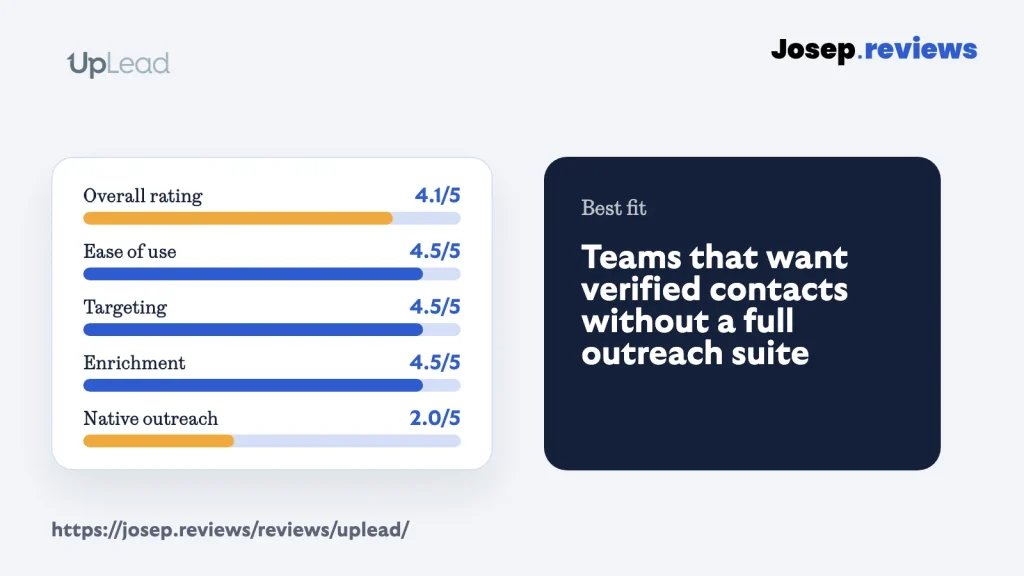
- My rating: 4.1 out of 5.
My main caution is scope. UpLead can be a useful data layer, but it’s not trying to replace the tools you use for sequencing, inbox management, reply handling or wider sales workflow.
I’d test it with a small, realistic sample of your ideal customer profile first: the exact job titles, regions, company sizes and tools you actually target. The value depends on how many valid emails and useful phone numbers you get back, not the headline database size.
Visit UpLeadWhat is UpLead?
UpLead is a sales intelligence and B2B contact data platform. In practical terms, it helps you search for companies and people, reveal verified business emails, enrich missing fields, build lists and export clean records into tools like your CRM.
The reason UpLead is interesting is that it feels more focused than many lead generation tools. The strongest use case isn’t “run my whole outbound motion.” It’s build a cleaner prospect list, check the data and move it into the place where your team already works.
That narrower focus makes the product easier to understand. If your workflow is search, verify, enrich and export, the simplicity can be a benefit.
See UpLead in action
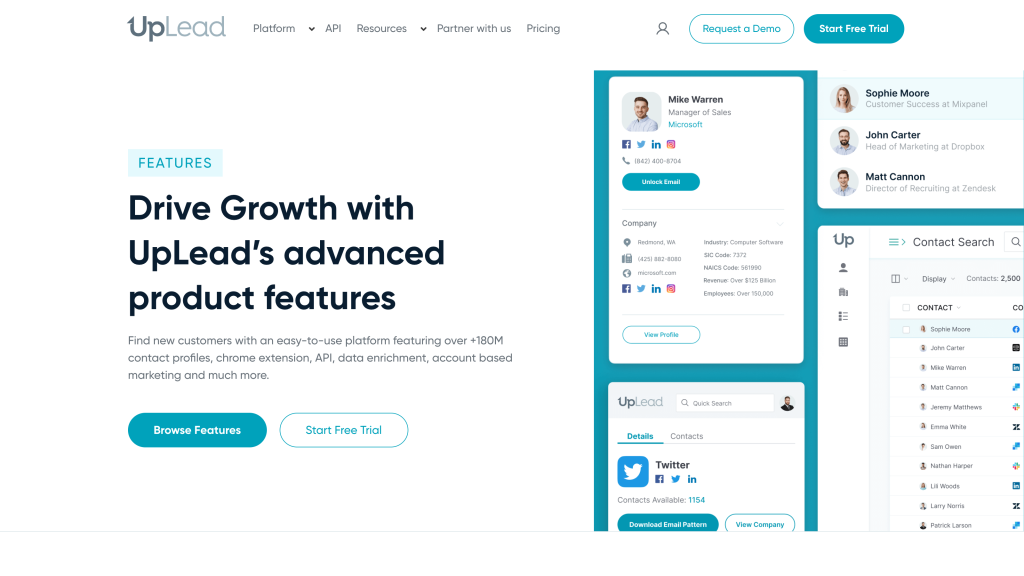
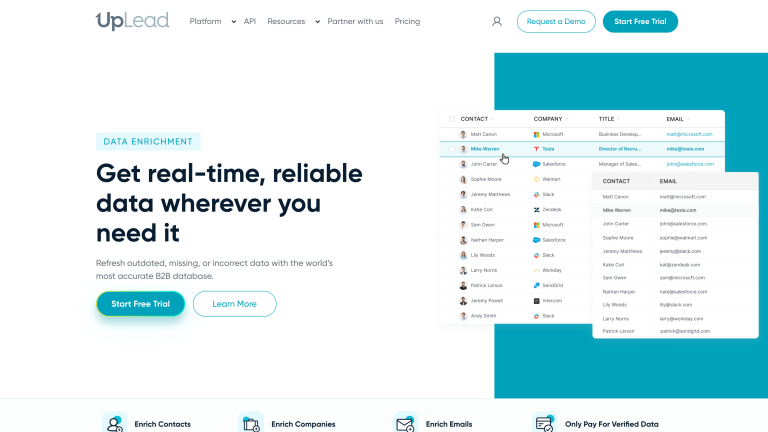
For the practical walkthrough, I focused on the UpLead areas that matter most before buying: pricing, database search and enrichment/data quality. There were no full backend screenshots available because the trial flow required extra phone/payment steps, so I kept this section to the captures I could verify cleanly.
UpLead pricing
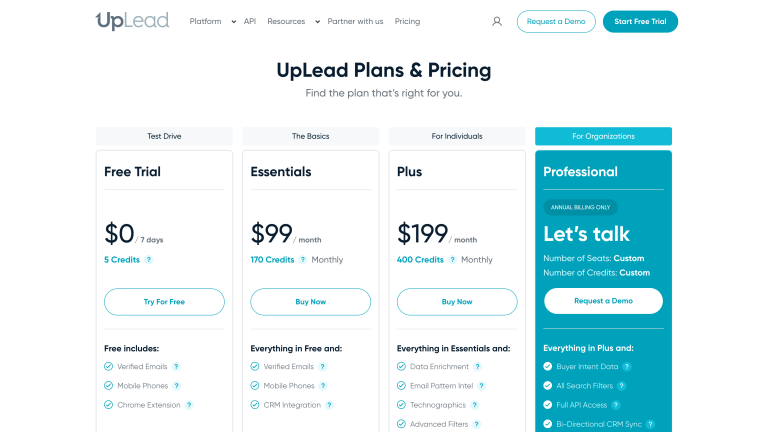
UpLead isn’t the cheapest tool in the group, but its pricing is easier to understand than many platforms with hidden enterprise quotes. The paid plans are mostly about monthly credits, enrichment depth and whether you need team or API features.
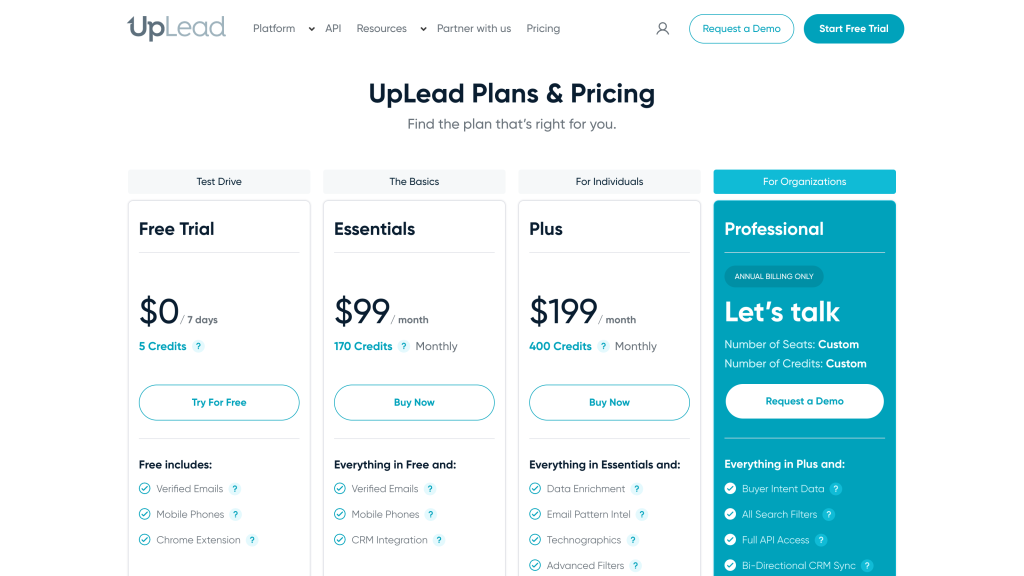
- Free trial: 7-day test with 5 credits for checking data quality.
- Essentials: $99/month with 170 credits, verified emails, mobile phones and CRM integrations.
- Plus: $199/month with 400 credits, enrichment, email pattern intel, technographics, advanced filters and suppression lists.
- Professional: Custom plan for teams that need intent data, API access, CRM sync and seat management.
There’s no ongoing free plan. The free option is a 7-day trial with 5 credits, so it’s useful for a quick data-quality check rather than continued free use.
The most useful pricing detail is the credit model. UpLead is clearer than many sales intelligence tools because one credit unlocks one contact for download or CRM export, but high-volume prospecting can still get expensive quickly.
My practical view is simple: UpLead can be good value if verified data reduces bounces, dead contacts and manual cleanup. It’s less attractive if you also need built-in sequencing, advanced automation or team controls, because those may require another tool or a higher plan.
UpLead is worth checking if you want verified B2B contacts and enrichment more than an all-in-one outbound platform.
UpLead pros and cons
Pros
Clean, easy workflow
The workflow is simple: search, apply filters, reveal verified contacts, and export to a spreadsheet or customer system in a few minutes, without needing training or a complex setup.
Quality-first contact data
It focuses on verified emails and direct dials, with real-time checks and credit refunds for bounced addresses, making it attractive if you care about fewer bounces rather than maximum volume.
Useful filters for target customers
Prospector supports 50+ filters like industry, seniority, company size, tools used, and interest topics, so you can build precise lists such as “marketing leaders at 50–200 person SaaS companies using HubSpot in the UK.”
Strong enrichment and cleanup
You can upload old or half-complete lists and let UpLead fill in missing emails, phones, roles, and company details for one credit per matched record, which is practical for refreshing a database before campaigns.
Support and documentation are solid
It advertises 24/7 human support, and reviews often call out helpful responses, while the help center covers core tasks like signup, enrichment, and exports clearly enough for most users.
Cons
Not an all-in-one outbound tool
There are no built-in sequences, inbox management, or calling tools; you still need a separate outreach platform to actually run campaigns.
Smaller global coverage
With roughly 160–180 million contacts, its data is smaller and more US-centric than major enterprise databases, which can limit reach in some regions or niche industries.
Phone data is weaker than email
Direct dials are included, but real accuracy for phone numbers is lower and more variable by region, so teams should test calls before betting a calling motion on UpLead alone.
Limited team/admin controls on lower plans
Free, Essentials, and Plus are effectively single-user; proper seat management and shared usage only appear on Professional, with little public detail on deeper controls like single sign-on or fine-grained permissions.
My take on UpLead
After reviewing UpLead, my take is that it's a strong data-first option for teams that want verified contacts and enrichment without a complicated workflow builder.
I'd choose UpLead if your team already has a CRM or outreach tool, mainly needs cleaner lead data to feed into it, and wants that data to connect easily with the workflow it already uses.
I wouldn't choose UpLead if you want the platform itself to handle serious sequencing, outbound automation and broader sales engagement. For that, Apollo (read review) is stronger if outreach should live in the same tool, while Clay (read review) is stronger for custom data workflows.
Overall, I rate UpLead 4.1 out of 5. It's one of the better SMB-friendly options in this batch, as long as you treat it as a clean data layer rather than a complete outbound system.
UpLead ratings
How I reviewed UpLead
For this UpLead review, I looked at it as a small B2B sales, marketing or recruiting team would: can I build a focused list, trust the email data, enrich missing fields, understand credits, and move clean records into a CRM or outreach tool?
I focused on the full data workflow rather than only the headline database size: search filters, verified email claims, phone data, enrichment, list handling, CRM export, integrations, API options, trial terms and privacy responsibilities.
Where a full paid account or live outreach campaign would have gone beyond a safe review test, I kept the review to sample workflows and plan-level checks. That’s why I score UpLead as a data layer, not as a complete outbound platform.
Key UpLead features
Database search
UpLead is useful when you need focused company and contact search without building a complicated workflow. The filter set is practical: job title, seniority, company size, location, technology use and buying-interest style signals.
I’d still test your actual market before committing. A generic search can look good in any B2B database; the real test is whether UpLead can find the specific people you sell to in your region, niche and company-size range.
For example, I wouldn’t only search for “VP Sales SaaS US”. I’d run the exact list you need, such as marketing leaders at 50-200 person software companies using HubSpot in the UK, then check how many records have verified emails, usable phones and current job titles.
Verified emails and phone data
UpLead’s strongest claim is data accuracy, especially around verified business emails. That matters because a cheaper list isn’t really cheaper if half the contacts bounce, the job titles are stale or your team spends hours cleaning bad records.
I’d be more careful with phone numbers. Direct dials are valuable, but phone coverage can vary much more by country, industry and seniority. For that reason, I’d judge UpLead on a small sample first, not only on the headline accuracy claim.
A practical test would be simple: export a small sample, verify bounce rate, check a few direct dials manually, and compare the result with your current data source for the same type of customer you normally target. That gives you a real cost per usable contact.
Enrichment
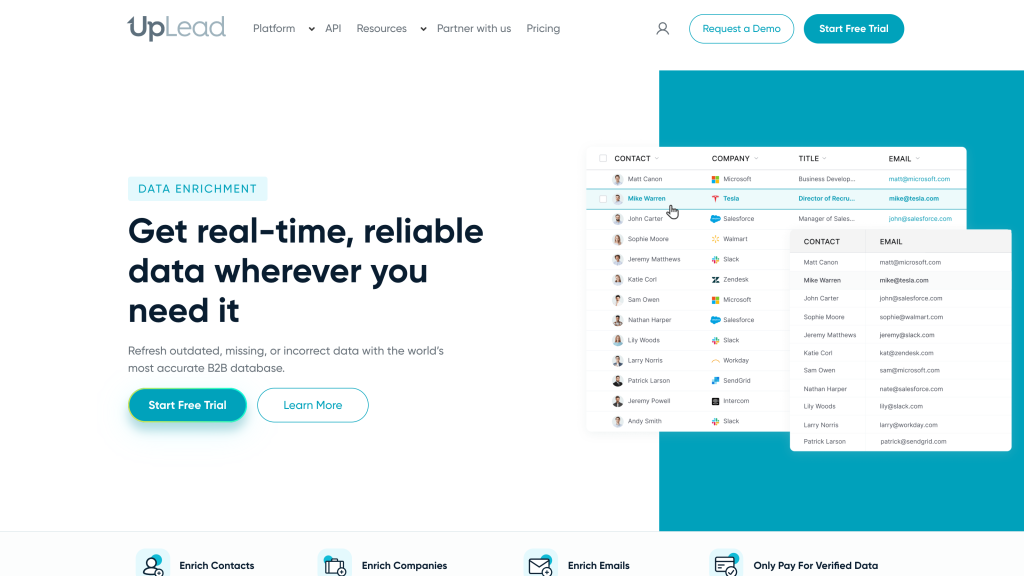
Enrichment is one of the stronger reasons to consider UpLead. If you already have partial records from a CRM, event list or spreadsheet, UpLead can help fill missing contact and company fields before those records go into an outbound campaign.
This is where UpLead feels different from a basic email finder. It’s not just about revealing one address; it’s about turning incomplete records into cleaner CRM-ready contacts with enough context to segment and route them properly.
The main thing I’d check is match rate. If UpLead enriches most of your real accounts cleanly, it can save a lot of manual cleanup. If your niche has weak coverage, the workflow still works, but the economics become less attractive.
CRM export and handoff
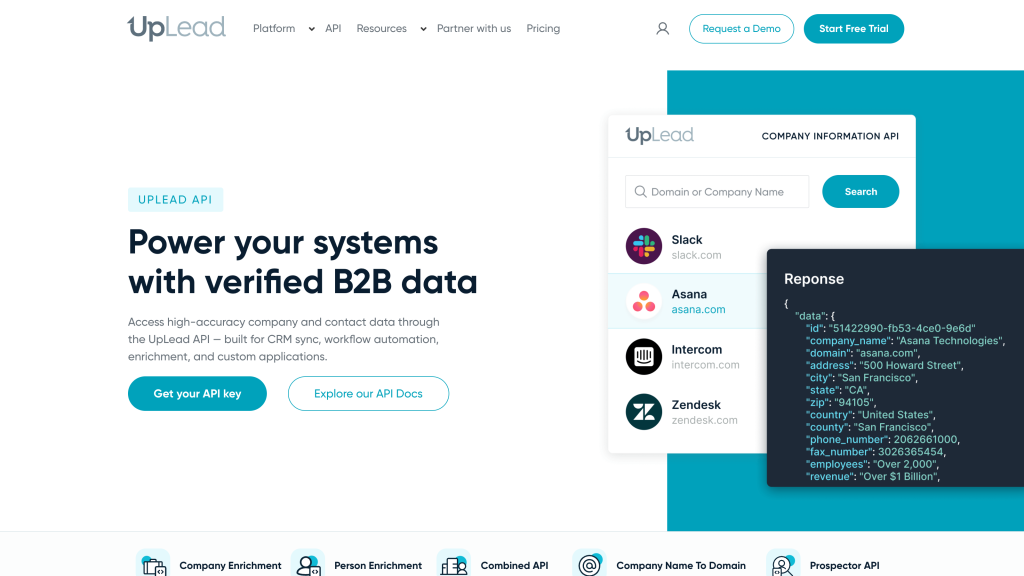
UpLead makes the most sense when the final destination is another tool: your CRM, spreadsheet or outreach platform. That’s a strength if your team already has a sending workflow and mainly needs better data going into it.
The handoff matters because lead generation shouldn’t end with a download. Good records need owners, fields, dedupe rules, suppression checks and a clear next step in the CRM or outreach tool.
For example, a clean workflow could be: build a list in UpLead, enrich missing fields, push only verified contacts into HubSpot or Salesforce, then run the actual sequence in your existing sending platform.
Outreach and sending risk
This isn’t where UpLead is strongest. It can feed Mailshake, Outreach, Reply, Lemlist or another sending tool, but I wouldn’t expect it to replace a dedicated sales engagement platform.
That’s not necessarily a problem. If you already like your sender, UpLead can stay focused on the data job. The risk is assuming verified emails alone make a campaign safe.
You still need your sending tool to handle warmup, daily limits, unsubscribe links, suppression lists, bounces and reply management. UpLead can reduce bad addresses, but it can’t make your domain reputation safe by itself.
Privacy and legal safety
UpLead has visible privacy documentation and opt-out rights, which is important for a business contact data provider. That’s reassuring, but it doesn’t make every campaign compliant automatically.
If you export UpLead data into a CRM or outreach tool, your responsibility continues there. I’d make sure opt-outs, suppression lists and regional rules move with the data, not only inside UpLead.
A respectful setup would usually include a few basic habits:
- Only export contacts that clearly fit the role, company and use case you’re targeting.
- Keep suppression lists synced between UpLead, your CRM and your sending platform.
- Use honest sender details, clear unsubscribe options and relevant outreach.
- Be extra careful with stricter regions and avoid storing fields you don’t need.
Final verdict
My final verdict is that UpLead is a strong focused option for verified B2B contact data. It’s easy to understand, but intentionally narrower than an all-in-one sales workflow platform.
I’d use it if your team already has an outreach workflow and needs better data going into it. I’d skip it if you want one platform to handle prospecting, enrichment and sequences together.
Overall, UpLead earns a 4.1 out of 5. The best way to judge it’s with a small sample of your ideal customer profile: valid emails, usable phones, enrichment match rate and real cost per usable contact.
UpLead alternatives



Apollo is better than UpLead if you want contact data, enrichment, email sequences and CRM workflows in one broader outbound platform. UpLead is cleaner for verified contacts, but Apollo is better when outreach should happen inside the same tool.
Clay is better than UpLead if you need custom enrichment logic, waterfall data providers, AI research and routing rules. UpLead is simpler for clean contact lists, but Clay is better when your team wants repeatable data workflows.
Lusha is better than UpLead if you want quick browser-led contact lookup and a lighter sales workflow. UpLead is stronger for verified email positioning, but Lusha is better when fast reveals and simple prospecting matter most.
Frequently asked questions
Yes, UpLead can be a good fit for small B2B teams that want verified emails, enrichment and CRM export without a heavy outbound platform.
UpLead isn’t strongest as a native outreach platform. I’d use it mainly for contact data and send records into another CRM or outreach tool.
UpLead is worth testing if verified email data and simpler list building are your priority. It’s less compelling if you need built-in sequences or complex automation.
Comment